ซ่อมคอมพิวเตอร์นอกสถานที่ บางกะปิ
www.becomz.com

  • ซ่อมคอมพิวเตอร์นอกสถานที่ บางกะปิ รามคำแหง

    ซ่อมคอมถึงบ้าน,ซ่อมคอมพิวเตอร์ถึงบ้าน,ซ่อมคอมนอกสถานที่,ซ่อมคอมพิวเตอร์ นอกสถานที่,วางระบบอินเตอร์เน็ต,วางระบบแลน,ระบบเน็คเวิร์ค,เขียนโปรแกรมเว็บไซด์,ดูแลคอมพิวเตอร์แบบรายเดือน-รายปี,พร้อมบริการด้านไอทีจ่าย. สนใจติดต่อ 095-954-4524

  • หากคุณกำลังมองหาสถานที่ รับซ่อมคอมถึงที่

    ราคือหน่วยรับซ่อมคอมพิวเตอร์ถึงที่ ไม่ว่าจะเป็นที่บ้าน ที่ทำงาน บริษัท ห้าง ร้าน สถานสงเคราะห์ โรงเรียน โรงพยาบาล ฯลฯ เราจะไปบริการซ่อมให้ในราคาสุดประหยัด ถูกกว่ายกไปซ่อมที่ห้างหรือร้านซ่อมแน่นอน เนื่องจากทางร้านของเราไม่ต้องเสียค่าเช่าพื้นที่ จึงสามารถลดต้นทุนในส่วนนี้ได้. สนใจติดต่อ 095-954-4524

  • www.becomz.com ให้บริการถึงที่

    บริการซ่อมคอมพิวเตอร์นอกสถานที่ โดยไม่ต้องยก เครื่องคอมให้เหนื่อย หรือ เสียเวลา การทำงานของคุณ เรา คือ ทางออกสำหรับคุณ ที่จะไป บริการถึงบ้าน ที่บ้าน หรือ อ๊อฟฟิต ( office ) และ คอนโด อาพาทเม้น ทุกสถานที่ พร้อม ทั้ง ให้ บริการซ่อมคอมพิวเตอร์ 24 ชั่วโมง สำหรับ ลูกค้าบางท่านที่สะดวก. สนใจติดต่อ 095-954-4524

  • ค่าบริการ

    – ซ่อมโปรแกรม แก้ปัญหาด้านโปรแกรมทั่วไป เครื่องละ 500 บาท – ลง Driver 300 บาท ซ่อมปกติเป็น 1000 บาท – อะไหล่เสีย จะแจ้งราคาอะไหล่ก่อนซ่อม (ลูกค้าสามารถจัดหาอะไหล่เองได้) เพื่อความมั่นใจ ซ่อมเสร็จเรารับประกันซอฟเเวร์ 7วัน พร้อมให้คำแนะนำ และบริการหลังซ่อม ตลอดการรับประกันน ติดตั้งให้ถึงที่ .สนใจติดต่อ 095-954-4524

  • รับซ่อมทุกปัญหา โทรมาคุยกันก่อนได้ครับ

    – บริการอัพเกรดเครื่อง แก้ปัญหาเครื่องช้า รวนบ่อย ค้างบ่อย – บริการติดตั้ง แก้ปัญหา ระบบคอมพิวเตอร์ ระบบแลน-อินเตอร์เน็ต – บริการลงวินโดว์, ลงโปรแกรม, แก้ไวรัส, แก้ปัญหาต่างๆ – บริการฝากซ่อม-เคลม อะไหล่คอมฯ และสินค้าไอที ทุกชนิด – บริการจัดสเป๊คเครื่อง จัดชุดคอมมือ1-2 พร้อมใช้งาน ติดตั้งให้ถึงที่ .สนใจติดต่อ 095-954-4524

  • รับซ่อมทุกปัญหา โทรมาคุยกันก่อนได้ครับ

    บริการติดตั้ง แก้ปัญหา ระบบคอมพิวเตอร์ ระบบแลน-อินเตอร์เน็ต – บริการลงวินโดว์, ลงโปรแกรม, แก้ไวรัส, แก้ปัญหาต่างๆ – บริการฝากซ่อม-เคลม อะไหล่คอมฯ และสินค้าไอที ทุกชนิด – บริการจัดสเป๊คเครื่อง จัดชุดคอมมือ1-2 พร้อมใช้งาน ติดตั้งให้ถึงที่ .สนใจติดต่อ 095-954-4524

WEBSITE DESIGN TEL 095-954-4524

วันพุธที่ 11 มกราคม พ.ศ. 2560

CINEMA 4D R17 [Full] one2up โหลดโปรแกรมทำแอนิเมชั่น 3 มิติ Sep2015


Maxon CINEMA 4D Studio R17

ดาวน์โหลด CINEMA 4D Studio R17 โปรแกรมทำแอนิเมชั่น 3 มิติ เวอร์ชั่นล่าสุด | 2.6 GB

Maxon CINEMA 4D Studio คือ โปรแกรมทำแอนิเมชั่น 3 มิติ ขั้นสูงที่มืออาชีพเลือกใช้กัน ไม่ว่าจะเป็นการสร้างตัวละคร การเคลื่อนไหวต่างๆ หรือแม้แต่ตัวอักษรก็ยังสามารถทำได้ และอื่นๆอีกมากมาย โดยในเวอร์ชั่นใหม่นี้ได้เพิ่มเครื่องมือที่ทันสมัยมากยิ่งขึ้น สามารถเพิ่มผมหรือขนของตัวละครได้อย่างรวดเร็วและง่ายดาย จุดเด่นของโปรแกรมนี้อยู่ที่หน้าตาการใช้งาน ที่สามารถปรับแต่งได้ตามความสะดวกและตามความชอบใจของเราเลย
นอกจากนี้ยังมีเครื่องมือสำหรับการปั้นโมเดลที่ยอดเยี่ยมอีกด้วย สามารถเรนเดอร์แบบที่คุณภาพดีที่สุด และความเร็วในการเรนเดอร์เร็วที่สุดตัวหนึ่งเลย เมื่อเที่ยบกับโปรแกรมทำแอนิเมชั่น 3 มิติตัวอื่นๆ ราคาก็แพงสุดๆอีกด้วย ถือว่าเป็นโปรแกรมทำแอนิเมชั่น 3 มิติ อีกตัวที่น่าสนใจเลยที่เดียวครับ
What’s new in Maxon CINEMA 4D Studio R17:
Release 17. Faster. Easier. More Realistic.
Cinema 4D R17 makes the easiest-to-use professional 3D software more efficient than ever before. New tools as well as expanded and completely reworked features help you turn your ideas into reality even quicker and with less effort. The improved workflow helps you meet the tightest deadlines. We’ve even gone so far as to re-invent the line!
Work Fast, Play More
Smooth workflows bring creativity to life. That’s why workflow is front and center in Cinema 4D Release 17. The revolutionary Take System will save precious time. The new Color Chooser does all those things you always wanted with color, as well as things you didn’t even know you wanted! Integration with Sketchup and the Houdini Engine make Cinema 4D your ideal hub. Let creativity flow.
Onboard spline tools with real-time feedback
Release 17 comes with a complete splines toolkit – no need to switch to an external tool. Easily create and modify splines with Cinema 4D’s new Pen tool, sketching, smoothing, arc tool, and boolean commands.
Intuitive and efficient organic modeling
Dozens of new features and improvements in Cinema 4D Release 17 make sculpting a true delight. Use Sculpt to PoseMorph, for example, to speed up character animation. Easily sculpt hard-surface models with Edge Detection. Release 17 makes sculpting in Cinema 4D easier than ever.
Better variability and usability with the new Variation and Formula Shaders
Release 17 offers new and expanded shaders to increase usability and performance. With the new Material Override function you can easily override specific channels of selected materials to create clay or matte renders.
Greatly improved Motion Tracking features
Integrating 3D assets into video just got easier. The Motion Tracking feature in Cinema 4D has been enhanced by adding the ability to correct lens distortion and by adding an intuitive tool for quickly eliminating problem track points.
System Requirements:
– Windows 8.1 64-bit (all versions)
– Windows 8 64-bit (all versions)
– Windows 7 64-bit (all versions)
– Windows 2012 Server 64-bit
Maxon CINEMA 4D Studio R17
ระบบปฏิบัติการ : Windows 2012 Server/ 7 / 8 and 8.1 (64บิทเท่านั้น)
ผู้พัฒนา : MAXON Computer
License : Shareware
ภาษา : Multilanguage
ขนาด : 2.6 GB
ประเภทไฟล์ : RAR
เวอร์ชั่น : R17.032
รหัสผ่าน : ไม่มี
ผู้อัพโหลด : MWTSoft
สถานะ : ทดสอบแล้ว
ยาแก้ไอ : Keygen
วิธีการติดตั้ง : มี
ปรับปรุงเมื่อ : 05/09/2015
Download : Here

Share:

SolidWorks 2016 Premium SP1 x64 [Full] one2up ออกแบบงาน 3D ไร้ขีดจำกัด ล่าสุด Jan2016

  SolidWorks Premium 2016

ดาวน์โหลด SolidWorks Premium 2016 เวอร์ชั่นล่าสุด | 10 GB

SolidWorks คือโปรแกรม แกรมออกแบบงาน 3D ที่ถูกใช้จริงในงานอุตสาหกรรมขนาดใหญ่ ปัจจุบันผลิตภัณฑ์ในอุตสาหกรรมขนาดใหญ่ ไม่ว่าจะเป็นอุตสาหกรรมสมาร์ทโฟน รถยนต์ รถจักรยานยนต์ อุปกรณ์เวชภัณฑ์ทางการแพทย์ หรืออุตสาหกรรมขนาดใหญ่อื่นๆ แน่นอนว่าลูกค้าย่อมต้องการทั้งลูกเล่นในการใช้งานที่น่าสนใจ และรูปลักษณ์ที่น่าใช้งาน  ซึ่ง SOLIDWORKS สามารถช่วยผู้ออกแบบได้ดีเยี่ยมในการถ่ายทอดความคิดสร้างสรรค์ ตั้งแต่แบบร่างสเก็ตช์งานและภาพร่าง มาเป็นแบบโมเดล 3D ได้อย่างรวดเร็ว ขณะเดียวกันก็มีทูลเซ็ตเพื่อการออกแบบให้เลือกใช้งานเมื่อต้องการถ่ายทอดไอ เดียความคิดมาเป็นผลิตภัณฑ์ในการวางตลาด ซึ่งถือว่าเป็นอีกหนึ่งโปรแกรมออกแบบ 3D ที่น่าสนใจเป็นอย่างมากครับ
System Requirements :
– The Windows 7.1 / 8.1 / 10 x64
– Memory: 8GB or more recommended Disk Space: 5 GB or more
– Processor: Intel and AMD with support for SSE2. 64-bit operating system.
– Video: Recommended certified graphics cards for workstations with support for OpenGL and tested drivers for them.
– Installation Tools: DVD-ROM or a broadband Internet connection.
– Internet Explorer: 9,10,11, Edge Excel and Word: 2010, 2013, 2016 Windows x32 and Windows XP / Vista / 7 SP0 / 8 – not supported
SolidWorks 2016
ระบบปฏิบัติการ : Windows  7 / 8 and 8.1 / Windows 10 (x64 เท่านั้น)
ผู้พัฒนา : SolidWorks Corp.
License : Shareware
ภาษา : Multilanguage
ขนาด : 10 GB
ประเภทไฟล์ : RAR
รหัสผ่าน : mawto
ผู้อัพโหลด : MWTSoft
สถานะ : ทดสอบแล้ว
ยาแก้ไอ : Patch
วิธีการติดตั้ง : มี
ปรับปรุงเมื่อ : 11/1/2016
Download : Here

Share:

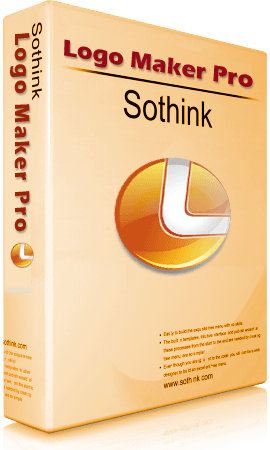
Sothink Logo Maker Pro 4.4 [Full+Crack] One2up โปรแกรมออกแบบโลโก้ สร้างโลโก้ Oct2016

sothink logo maker pro

ดาวน์โหลด Sothink Logo Maker Pro 4.4 เวอร์ชั่นล่าสุด โปรแกรมออกแบบโลโก้ สร้างโลโก้ | 31 MB


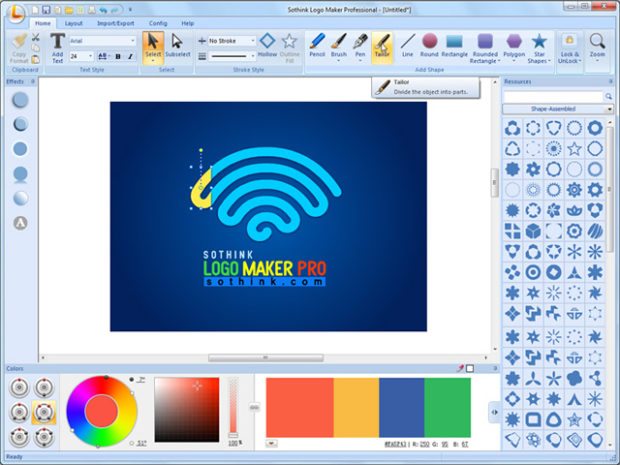
Sothink Logo Maker Pro คือ โปรแกรมสร้างโลโก้ ที่จะช่วยให้เราออกแบบโลโก้ตามสไตล์ของเราเลย นอกจากจะสร้างโลโก้ได้แล้วยังสามารถสร้างหรือออกแบบปุ่มต่างๆ, แบบโลโก้ร้าน, โลโก้เว็บไซต์, ออกแบบแบนเนอร์ก็สามารถทำได้เช่นกัน โปรแกรมนี้มีเทมเพลตให้เลือกมากมายกว่า 100 เทมเพลตเตรียมไว้ให้เรา มีจานสีกว่า 2000 รูปแบบสี ปรับแต่งข้อความตัวอักษรได้อย่างง่ายดาย มีความยื่นหยุ่นและอิสระในการออกแบบ
และยังมีเครื่องมือดีไซน์มากมายให้ได้ใช้อย่างจุใจกันเลยทีเดียวโปรแกรมนี้ถือว่าใช้งานง่าย ถึงแม้ว่าเราจะไม่เคยออกแบบหรือสร้างโลโก้มาก่อนเลยก็ตามเราก็สามารถใช้โปรแกรมนี้ได้อย่างง่ายดายเหมือนมืออาชีพเลยทีเดียวโปรแกรมนี้ถือว่าเป็นโปรแกรมที่เหมาะมากสำหรับผู้ที่ต้องการสร้างโลโก้ให้กับองค์กรธุรกิจ หรือร้านค้ากิจการของเรา โดยไม่ต้องไปจ้างนักออกแบบโลโก้ให้เสียเงินครับ
ความสามารถของ Sothink Logo Maker Pro
– Master Color Schemes ช่วยให้คุณเลือกสีสรรในการออกแบบ Logo ได้อย่างง่าย และสวยงาม
– ใส่เอฟเฟคสวยๆ แปลกแนวไม่ซ้ำใครให้กับโลโก้ของคุณ
– ภายในโปรแกรม ออกแบบ Logo ทำงานแบบ Layout ซึ่งจะทำให้งานออกแบบ Logo นั้นดูเป็นมืออาชีพ และง่ายต่อการแก้ไขในภายหลัง
– มีระบบดินสออัจฉริยะ ในส่วนของ Pencil และ Pen Tools ให้คุณได้วาดรูปโลโก้อย่างอิสระ ตามต้องการ
– มีเครื่องมือ และเอฟเฟค รวมถึงเครื่องมืออำนวยความสะดวกอื่นๆ อีกมากมาย
– มีเทมเพลตหรือรูปแบบโลโก้ สำเร็จรูป ให้เลือกหลากหลายรูปแบบที่พร้อมให้คุณได้ใช้ และเทมเพลตถูกแยกเป็นสัดส่วน ซึ่งทำให้คุณสามารถค้นหาเทมเพลตที่ต้องการได้อย่างรวดเร็ว
logo-design-software-interface
ระบบปฏิบัติการ : Windows XP/ Vista / 7 / Windows 8 and 8.1
ผู้พัฒนา : SourceTec Software Co., LTD.
License : Shareware
ภาษา : Multilingual
ขนาด : 31 MB
ประเภทไฟล์ : RAR
เวอร์ชั่น : 4.4 Build 4625
รหัสผ่าน : mawto
ผู้อัพโหลด : Mawto@Software
สถานะ : ทดสอบการติดตั้งแล้ว
ยาแก้ไอ : Patch
วิธีการติดตั้ง : ไม่มี
ปรับปรุงเมื่อ : 22/10/2016
Download : Here
Share:

SketchUp Pro 2017 17 [Full] One2up x64 ของแพง!! โปรแกรมเขียนแบบ 3 มิติ Nov2016

sketchup_icon

ดาวน์โหลด SketchUp Pro 2017 (64bit) + Crack โปรแกรมออกแบบงาน 3 มิติ เวอร์ชั่นล่าสุด | 170 MB

SketchUp Pro 2017 คือโปรแกรมที่ใช้ออกแบบงาน 3 มิติ ไม่ว่าจะเป็นงานสถาปัตยกรรม งานวิศวกรรม งานออกแบบภายใน งานออกแบบผลิตภัณฑ์ งานออกแบบเกม และงานออกแบบอื่น เป็นต้น มีเครื่องมือที่หลากหลายไว้เลือกใช้งานและยังมีราคาที่แพงเกือบ 20,000 บาท เลยทีเดียว แต่ก็ยังถือว่าถูกเมื่อเทียบกับซอฟต์แวร์ CAD ประเภทอื่นๆ
sketchup-pro-2017
มีผู้คนมากมายหลากหลายสายงานที่เลือกใช้ SketchUp Pro ไม่ว่าจะเป็นงานทางด้าน สถาปัตยกรรม, การก่อสร้าง, วิศวกรรม, ตกแต่งภายในเชิงพาณิชย์, การก่อสร้างเกี่ยวกับองค์ประกอบของแสง,ภูมิสถาปัตยกรรม , การออกแบบห้องครัวและห้องน้ำ, การวางผังเมือง, การออกแบบเกม, ภาพยนตร์และองค์ประกอบเวทีและงานไม้เป็นต้น
SketchUp Pro เปรียบเสมือนดินสออันทรงพลัง เริ่มต้นจากการวาดเส้นและรูปร่างต่างๆ การดึงเข้าดึงออกพื้นผิวต่างๆเพื่อให้เป็นรูปแบบ 3d สามารถยึด,คัดลอก,หมุนและ paint ได้ตามที่คุณต้องการ ประสบการณ์อันน่าทึ่งกำลังรอคุณอยู่
หลายคนสงสัยว่ามันต่างกันกับ Google SketchUp ยังไง อธิบายว่า Google SketchUp ได้เปลี่ยนไปอยู่ในมือของ Trimble Navigation Limited เมื่อปลายปีที่ผ่านมา (พ.ย. 2555) และได้ชื่อใหม่เป็น Trimble SketchUp นั่นเองครับ ซึ่งตอนนี้ได้ออกเวอร์ชั่นล่าสุดคือ 2015
 ระบบปฏิบัติการ : Windows  7 / 8 and 8.1 /  Windows 10
ผู้พัฒนา : Trimble Navigation Limited
License : Shareware
ภาษา : English
ขนาด : 170 MB
ประเภทไฟล์ : RAR
เวอร์ชั่น : 17.1.174
รหัสผ่าน : mawto
ผู้อัพโหลด : MTS0ft
สถานะ : ทดสอบแล้ว
ยาแก้ไอ : Patch
วิธีการติดตั้ง : มี
ปรับปรุงเมื่อ : 22/11/2016
Download : Here
Share:

Autodesk AutoCAD 2017 [Full] One2up x86/x64 โปรแกรมเขียนแบบ ตัวเต็มล่าสุด Dec2016

Autodesk-AutoCAD-2017

ดาวน์โหลด Autodesk AutoCAD 2017 โปรแกรมเขียนแบบ 2D 3D อัจฉริยะ | 2.3 GB


Autodesk AutoCAD คือ ซอฟแวร์ที่เชื่อมต่อเวิร์กโฟลว์การออกแบบของคุณที่ไม่เคยมีที่ไหนมาก่อน เครื่องมือ Design feed ทำงานร่วมกับสังคมออนไลน์ ผ่านแบบงานของคุณ ช่วยประหยัดเวลาและเครื่องมือ Live Maps ช่วยให้คุณวางตำแหน่งงานที่คุณออกแบบลงบนตำแหน่งบนแผนที่ AutoCAD เชื่อมต่อแนวคิดการออกแบบทุกสิ่งบนโลกรอบๆ ตัวคุณ Autodesk AutoCAD 2017 เป็นโปรแกรมด้านการออกแบบ computer-aided design (CAD)ตัวใหม่ล่าสุดซึ่งถือว่าเป็นชุดโปรแกรมการออกแบบที่ทรงพลังที่สุดในบรรดาโปรแกรม AutoCAD ที่เคยมีมา ซึ่งคุณสมบัติใหม่ใน Autodesk AutoCAD 2017 คือการเพิ่มประสิทธิภาพการทำงานเชื่อมต่อระหว่างเดสก์ท็อป, คลาวด์และอุปกรณ์เคลื่อนที่อื่นๆ ได้อย่างไหลลื่น AutoCAD เป็นซอฟต์แวร์คอมพิวเตอร์ CAD สำหรับการออกแบบสองมิติและสามมิติที่พัฒนาโดย Autodesk ผลิตภัณฑ์ตระกูล AutoCAD เป็นทั้งเป็นซอฟต์แวร์ CAD ใช้กันอย่างแพร่หลายมากที่สุดในโลก
SYSTEM REQUIREMENTS FOR AUTOCAD 2017
Operating System
  • Microsoft® Windows® 10 (desktop OS)
  • Microsoft Windows 8.1 with Update KB2919355
  • Microsoft Windows 7 SP1
CPU Type1 gigahertz (GHz) or faster 32-bit (x86) or 64-bit (x64) processor
MemoryFor 32-bit AutoCAD 2017:
  • 2 GB (3 GB recommended)
For 64-bit AutoCAD 2017:
  • 4 GB (8 GB recommended)
Display Resolution1360×768 (1600×1050 or higher recommended) with True Color.
125% Desktop Scaling (120 DPI) or less recommended.
Display CardWindows display adapter capable of 1360×768 with True Color capabilities and DirectX® 9 ¹. DirectX 11 compliant card recommended.
Disk SpaceInstallation 6.0 GB
Pointing DeviceMS-Mouse compliant
DigitizerWINTAB support
Media (DVD)Download and installation from DVD
BrowserWindows Internet Explorer® 9.0 (or later)
.NET Framework.NET Framework Version 4.6
ToolClips Media PlayerAdobe Flash Player v10 or up
NetworkDeployment via Deployment Wizard.
The license server and all workstations that will run applications dependent on network licensing must run TCP/IP protocol.
Either Microsoft® or Novell TCP/IP protocol stacks are acceptable. Primary login on workstations may be Netware or Windows.
In addition to operating systems supported for the application, the license server will run on the Windows Server® 2012, Windows Server 2012 R2, Windows Server 2008, Windows 2008 R2 Server editions.
Citrix® XenApp™ 6.5 FP1, Citrix® XenDesktop™ 5.6.
autodesk autocad 2017
ระบบปฏิบัติการ : Windows 7 / 8 and 8.1 /  Windows 10
ผู้พัฒนา : Autodesk
License : Shareware
ภาษา : Multilingual
ขนาด : 2.3 GB
ประเภทไฟล์ : RAR
รหัสผ่าน : mawto
ผู้อัพโหลด : MTS0ft
สถานะ : ทดสอบแล้ว
ยาแก้ไอ : Keygen
วิธีการติดตั้ง : มี
ปรับปรุงเมื่อ : 27/12/2016
Download : Here
Share:

วันศุกร์ที่ 6 มกราคม พ.ศ. 2560

CyberLink YouCam Deluxe 7.0.2316 [Full] One2up ถาวร โปรแกรมเว็บแคม ล่าสุด Dec2016

 CyberLink YouCam Deluxe

CyberLink YouCam Deluxe 7 Full Patch การเล่นเว็บแคมจะดูน่าสนใจ และไม่น่าเบื่ออีกต่อไป | 433MB

Cyberlink Youcam 2015 :โปรแกรมสนทนาที่ใช้กล้องเว็บแคมเป็นส่วนประกอบมีมากขึ้นปัจจุบัน การที่ภาพจากกล้องวีดีโอแคมของเรามีความคมชัด มีความละเอียดสูงหรือมีลูกเล่นต่างๆ จึงเป็นการดึงดูดความสนใจได้ดีกว่าการเปิดกล้องเฉยๆแน่นอน Cyberlink Youcam คือโปรแกรมที่สามารถทำงานร่วมกับโปรแกรมสนทนาผ่านทางกล้องเว็บแคมได้หลากหลาย ไม่ว่าจะเป็น skype,msn หรือ camfrog โดยมีจุดเด่นของโปรแกรมคือภาพที่มีความคมชัดสูง และลูกเล่นต่างๆมากมาย ที่เราสามารถดาวน์โหลดเพิ่มเติมได้เอง ซึ่งความสามารถต่างๆของโปรแกรมมีดังนี้
– รองรับระบบภาพแบบ HD คุณภาพสูง ทำให้สามารถถ่ายภาพหรือคลิบวีดีโอด้วยความคมชัดสูง หมดปัญหาภาพเบลอ
– สามารถเพิ่มเอฟเฟคต่างๆให้กับกล้องเว็บแคม ไม่ว่าจะเป็น เอฟเฟคหิมะตก , เอฟเฟคกลีบกุหลาบ , ใส่หน้ากาก และเอฟเฟคต่างๆอีกมากมายให้คุณได้เลือกใช้ และสนุกไปกับมัน
– สามารถอัพโหลดรูปภาพ และคลิบวีดีโอขึ้นสู่ Facebook หรือ social network อื่นๆ ได้อย่างง่ายดาย
Apply real-time fun effects for video chatting and WebCam recording
Enjoy fun Instant Messenger chats and video recordings with over 200 fun effects in YouCam – including the amazing 3D augmented reality, face-tracking avatar and particle effects! YouCam 6 also includes 50 new animated emoticons, animated frames and face-tracking gadgets, providing the most fun WebCam experience than ever!Entertaining Instant Messenger Chat
YouCam 6 supports major instant messenger software, including Skype and Yahoo! Messenger. Impress all your online contacts with the huge variety of new fun effects – video chatting never been so easy and fun!Fun with Video Recording
Use your WebCam to record video greetings with coolest effects.You can add magic particles, dress up yourself with cool gadgets, overlay emoticon objects, and share your video recordings via Facebook and YouTube! YouCam 6 Deluxe includes over 50 brand new effects, you can also get thousands of FREE effects from DirectorZone.com.Best Video Quality
CyberLink’s unique TrueTheater® Enhancement Technology will auto-adjust the lighting and sharpness with just a click of a button. You can also manually adjust the level of noise reduction, contrast, brightness and image enhancement.Use Your WebCam as a Makeup Mirror
YouCam makes the most out of your WebCam. The YouCam Mirror is a fun gadget that turns your WebCam into a makeup mirror.Capture amazing photos with PC camera and edit with ease (NEW!)
Turn Your tablet PC into amazing camera! Use YouCam’s touch-friendly interface to take panorama photos, HDR photos or snapshots. Select from a variety of photo editing tools to color-up your photo creations!Various Photo Shooting Modes (NEW!)
YouCam 6 transforms your PC into a creative camera. You can take Panorama and HDR shots with your front or rear camera. Use the new Burst mode to capture up to 10 continuous photos in once click.Stunning Panorama Photos (NEW!)
Use your tablet PC’s camera to capture stunning Panorama shots. Capture multiple photos and stitch them into a wide-angle Panorama photo.Dramatic HDR Photos (NEW!)
Apply real-time HDR effects when taking photos in low lighting or high contrast scenes. Enhance the shadow and highlight of your photos, and bring out more details in your photo.Stylish Photo Frames (NEW!)
Give you photo a professional finishing touch by adding the photo frame of your choice. YouCam 6 includes a wide variety of specially designed frames.Paint on Your Photos (NEW!)
Personalize your photo with YouCam 6’s hand paint tools. Draw on your photos freely using a range of brush size and color. Directly draw with your fingers on your touch-screen PCs.Photo Crop & Rotate (NEW!)
Extract the best part of your photos with easy crop and rotate tools. Choose from different ratio sets to crop your photo, or freely rotate the photos to get the perfect angle.One-Click Photo Presets (NEW!)
Apply one-click photo presets to your photos to instantly change the atmosphere. You can also download unlimited presets from CyberLink’s DirectorZone.com online community.Create professional business video presentation and desktop recording
YouCam lets you put your webcam to work with an array of productivity features. Create video presentations using your PowerPoint files and capture your PC screen display in full HD. The powerful Face Login and Face-Out feature provides the easiest way to log in to your PC and it locks your screen automatically when you are away.Full HD Quality Desktop Recording (ENHANCED!)
Use YouCam’s desktop recording feature to record full screen in 16:9 or 4:3 aspect ratio. You can record specific region of your screen, or a fixed region following mouse movement. Record up to Full HD 1920 x 1080 resolution.Organize your media with face tags and browse with calendar view (NEW!)
YouCam 6 provides the easiest way to manage your media library. Your photos and videos are automatically organized in a calendar view. Also features quick and smart face tagging for easy search.Recommend Minimum System Requirement for FullHD (1080p) Effect
– OS: Windows 8/7 (with DirectX 9 or above)
– Memory: 4GB
– CPU: Intel® Core™ i5-3360M 2.80GHz (4 CPUs) or AMD A8-5600K APU with Radeon™ HD Graphics
– Hard Disc Space: 1GB required
– VGA Card: Intel® HD Graphics 4000 or AMD Radeon™ HD 7560D
What’s New in YouCam Deluxe 7.0:
– Adds support for Windows 10.
– Adds support for Skype for Business.
– Adds support for the use of Firefox and Chrome for Face Login.
– Adds support for new AMD hardware encoder with driver 15.7 or later.
– Minor bug fixes.
CyberLink YouCam Deluxe
ระบบปฏิบัติการ : Windows XP/ Vista / 7 / Windows 8 and 8.1
ผู้พัฒนา : CyberLink
License : Shareware
ภาษา : Multilingual
ขนาด : 433 MB
ประเภทไฟล์ : RAR
เวอร์ชั่น : 7.0.2316.0
รหัสผ่าน : mawto
ผู้อัพโหลด : MWTS0ft
สถานะ : ทดสอบแล้ว
ยาแก้ไอ : Keygen
วิธีการติดตั้ง : มี
ปรับปรุงเมื่อ : 11/12/2016
Download : Here
Share:

EaseUS Data Recovery Wizard Unlimited 8.8 [Full + Key] One2up โปรแกรมกู้ข้อมูลชื่อดัง ล่าสุด Apr2015

ดาวน์โหลด EaseUS Data Recovery Wizard Unlimited 8.8 เวอร์ชั่นล่าสุด | 10 MB


Easeus Data Recovery Wizard คือ โปรแกรมกู้ข้อมูลไฟล์ต่างๆใน Hard disk เช่น ไฟล์ภาพ, ไฟล์เอกสาร, ไฟล์เสียง, ไฟล์วิดีโอ, ไฟล์บีบอัดZIPและอีเมล์, ฮาร์ดไดรฟ์-ภายนอก (external hdd), USB Flash Drive, กล้อง, การ์ดหน่วยความจำ Memory Stick ที่ถูกลบจากฮาร์ดดิสก์ไดรฟ์, ฟล็อปปี้ดิสก์หรือสื่อเก็บข้อมูลอื่น ๆ, กู้คืนจากระบบแฟ้มลินุกซ์ภายใต้ระบบ Windows, การกู้คืนไฟล์ที่ถูกลบจากถังรีไซเคิล Recycle Bin และยังมีส่วนกู้ข้อมูลที่ละ Drive และกู้ข้อมูลทั้งฮาร์ดดิสก์ สนับสนุน FAT12, FAT16, FAT32, NTFS/NTFS5, ext2/ext3
ความสามารถคร่าวๆ
– กู้คืนและค้นหาไฟล์ที่หายไปอย่างรวดเร็ว
– กู้ไฟล์จากพาร์ทิชั่นที่ถูกลบ
– กู้ไฟล์ฮาร์ดดิสก์แบบ Dynamic, RAID
– กู้ไฟล์จากพาร์ทิชั่นที่เป็นไฟล์ระบบแบบ Linux ภายใต้ระบบปฏิบัติการวินโดวส์
-รองรับการกู้ไฟล์จากอุปกรณ์เก็บข้อมูลทุกชนิด
– การกู้ไฟล์ทีมีคุณภาพสูง
– สามารถใช้งานฟีเจอร์ Repair Service ได้ฟรี
– สามารถใช้งานโปรแกรมนี้ในรูปแบบ Portable ผ่าน WinPE
System Requirements:
– Operating System: Windows 8.1, Windows 8, Windows 7, Windows Vista, Windows XP, Windows 2000, Windows Server 2012, Windows Server 2008, Windows Server 2003
– File System: FAT(FAT12, FAT16, FAT32), NTFS, NTFS5, ext2, ext3
– CPU: at least with x86.
– RAM: at least 128 MB.
– Disk Space: the minimum of the space for installing Data Recovery Wizard is 32 MB.
What’s new in version 8.8.0:
– Improved algorithm increases search speed by 50%.

ระบบปฏิบัติการ : Windows XP/ Vista / 7 / Windows 8 and 8.1
ผู้พัฒนา : EaseUS
License : Shareware
ภาษา : Multilingual
ขนาด : 10 MB
ประเภทไฟล์ : RAR
เวอร์ชั่น : 8.8.0
รหัสผ่าน : ไม่มี
ผู้อัพโหลด : MWTS0ft
สถานะ : ทดสอบแล้ว
ยาแก้ไอ : Keygen
วิธีการติดตั้ง : ไม่มี
ปรับปรุงเมื่อ : 24/04/2015
Download : Here
Share:

Disqus Shortname

Comments system

ขับเคลื่อนโดย Blogger.

จำนวนการดูหน้าเว็บรวม

Blog Archive

Post Top Ad

คลังบทความของบล็อก

Author Details

Menu - Pages

Business

Random Posts

Recent

Popular

Blog Archive